 ExtractFox
Three real tests
We made three pictures of tables the way people actually have them: a printed stock sheet photographed with a phone, a screenshot of a sales dashboard, and a handwritten timesheet. Each went through this page with "Everything" selected, and we downloaded the Excel file it produced. Every cell was then compared with the table we drew. Nothing below was edited; the pictures and the .xlsx files are downloadable at the end of this section.
1. A phone photo of a printed sheet
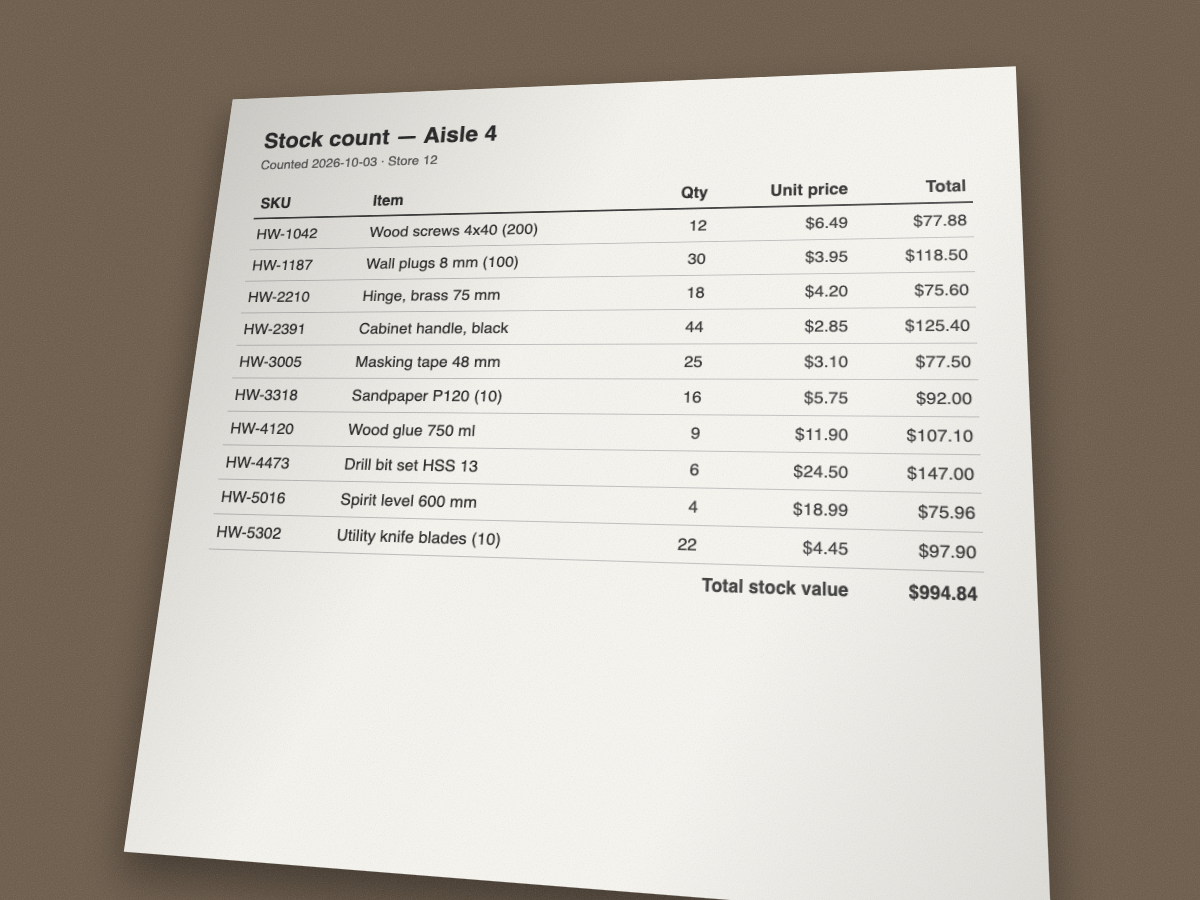
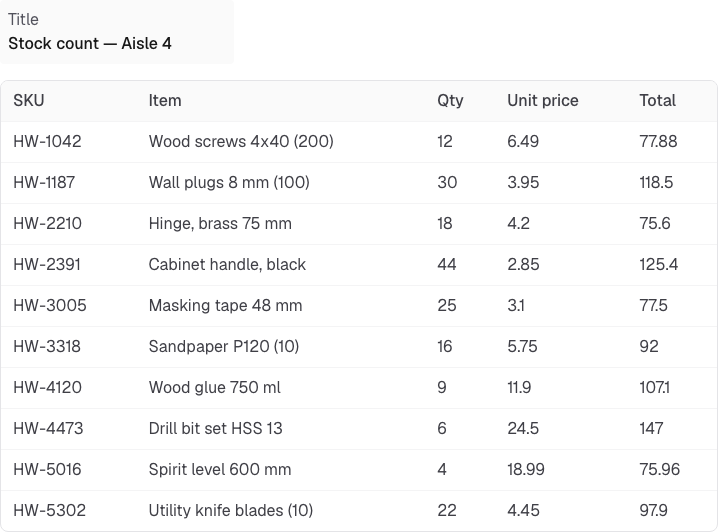
In the Excel file, Qty, Unit price and Total are number cells ($6.49 became 6.49), so =SUM(E2:E11) gives 994.84, the total printed on the sheet. The "Total stock value" line stayed out of the rows, because it's a summary, not an item.
2. A screenshot of a dashboard
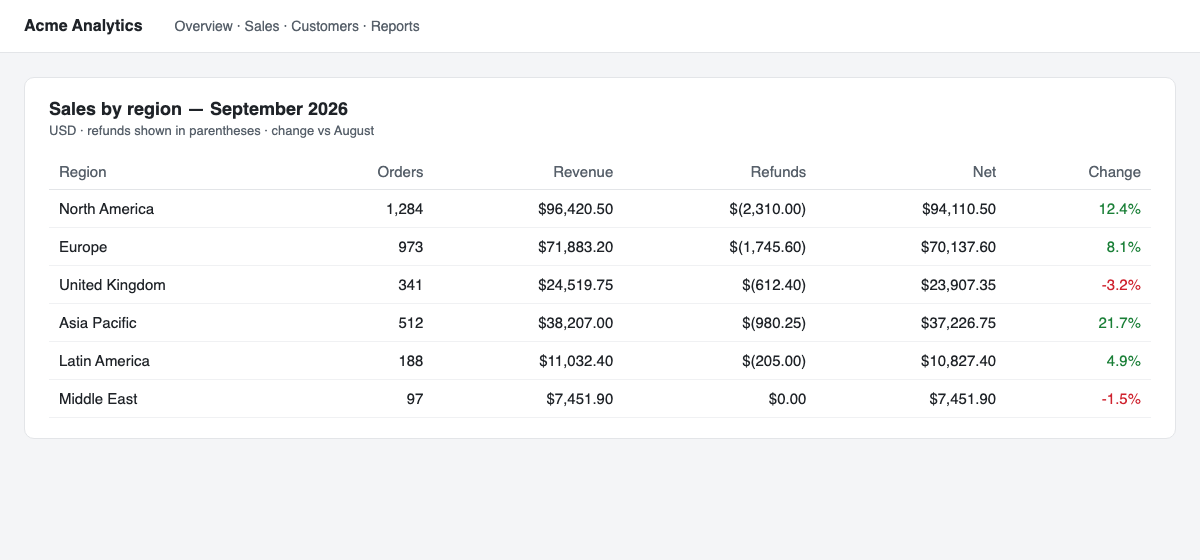
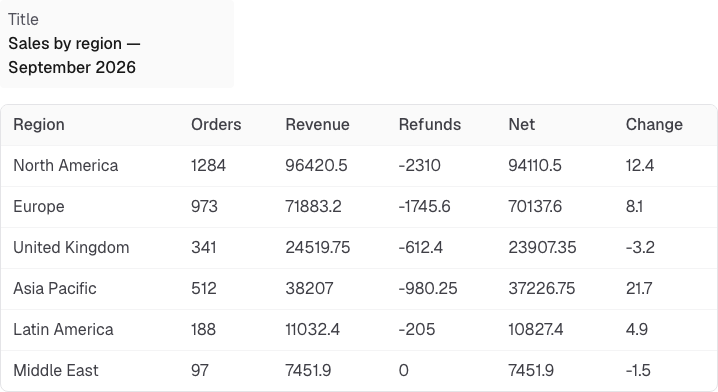
$96,420.50 came back as 96420.5 and ($2,310.00) as -2310, so the refunds column sums to a negative number the way an accountant expects. The navigation bar and the subtitle were left out.
3. A handwritten timesheet
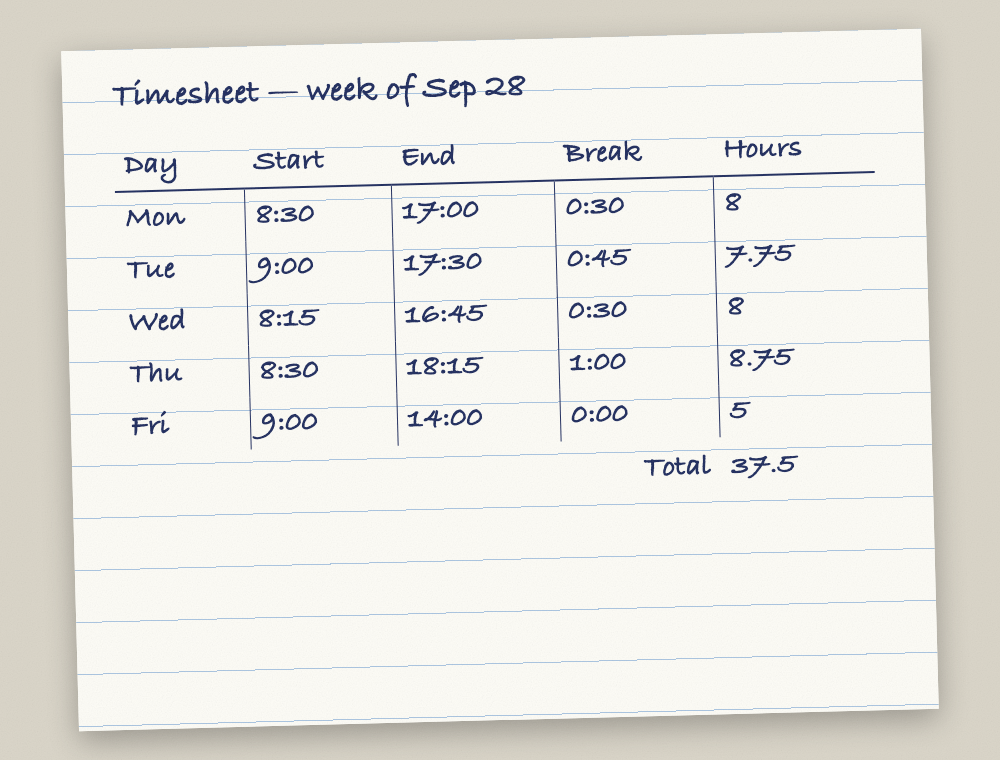
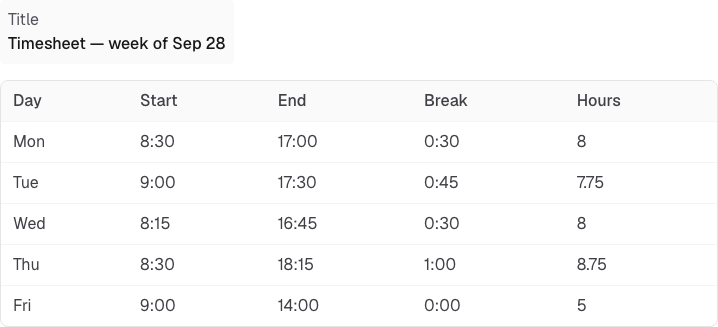
Times stay as written (8:30, 17:00) and Hours is a number column, so the week adds up to 37.5 in Excel.
- Phone photo (PNG)
- Phone photo, Excel result
- Dashboard screenshot (PNG)
- Dashboard, Excel result
- Handwritten timesheet (PNG)
- Timesheet, Excel result
- Scores for every case (JSON)
Results side by side
Cells right = the value in the right row and column, compared with the table we drew. Tesseract returns lines of text with no columns, so for it we counted how many of the true values appear anywhere in its output, which flatters it.
| Picture | Cells | ExtractFox: cells right | Number cells in the .xlsx | Seconds | Tesseract: values found in its text |
|---|---|---|---|---|---|
| Phone photo | 50 | 50 | 30 (Qty, Unit price, Total) | 6.2 | 46 |
| Dashboard screenshot | 36 | 36 | 30 (every numeric column) | 4.3 | 29 |
| Handwritten timesheet | 25 | 25 | 5 (Hours) | 4.3 | 20 |
Three pictures is a demonstration, not a benchmark, and all three were legible. Where it breaks: digits smaller than about 9 pixels high, a column cut off at the edge of the picture, and glare sitting on a number. In those cases the cell comes back empty rather than guessed, so look for blanks before you rely on a total.
Why plain OCR isn't enough for a table
Tesseract read most of the characters on the clean pictures. What it returns is lines of text: "HW-1187 Wall plugs 8 mm (100) 30 $3.95 $118.50". To get that into Excel you still have to split every line into columns, and spaces inside item names make that guesswork. On the phone photo it turned the first total into "eee" and the header line into "ow od Qty"; on the timesheet a break of 0:45 became "O:-4S". Amounts keep their $ signs and commas, so Excel stores them as text until you clean them.
Timesheet — week of Sep 28

pay Start end Break Hours

Mow 8:30 17:00 0:30 g

Tue 9:00 17:30 O:-4S FFs
Excel's own Data from Picture
Excel can do this too: Data > From Picture takes a picture file or a screenshot from the clipboard. It needs a Microsoft 365 subscription, Microsoft recommends a head-on, cropped picture of only the table, and you then review the cells it flags before inserting them. If you already pay for Microsoft 365 and your pictures are clean screenshots, it's a good option. This page needs no Office account, takes angled photos and pictures with more than one table, and can return only the rows or columns you ask for.
Getting a clean result
- Fill the frame with the table. You don't need to crop the desk or the browser around it, but small text is where digits go wrong.
- One photo per page of a long table; upload them together on a paid plan and they come back as one sheet with a source_file column.
- To narrow it down, type what you want in the box above the button: "only rows where Qty is under 10", "just SKU and Total".
- Times and codes like 8:30 or HW-1042 stay as text on purpose, so Excel doesn't turn them into dates or drop leading zeros.
Sources
- Tesseract 5.5.3 run as tesseract image.png - --psm 6, October 7, 2026
- Microsoft Support, "Insert data from picture" (support.microsoft.com), checked October 7, 2026
- ExtractFox runs on the same pictures, October 7, 2026; script in the repo at scripts/samples/image-to-excel.mjs, method on how we test